
Core Web Vitals checklist for service websites
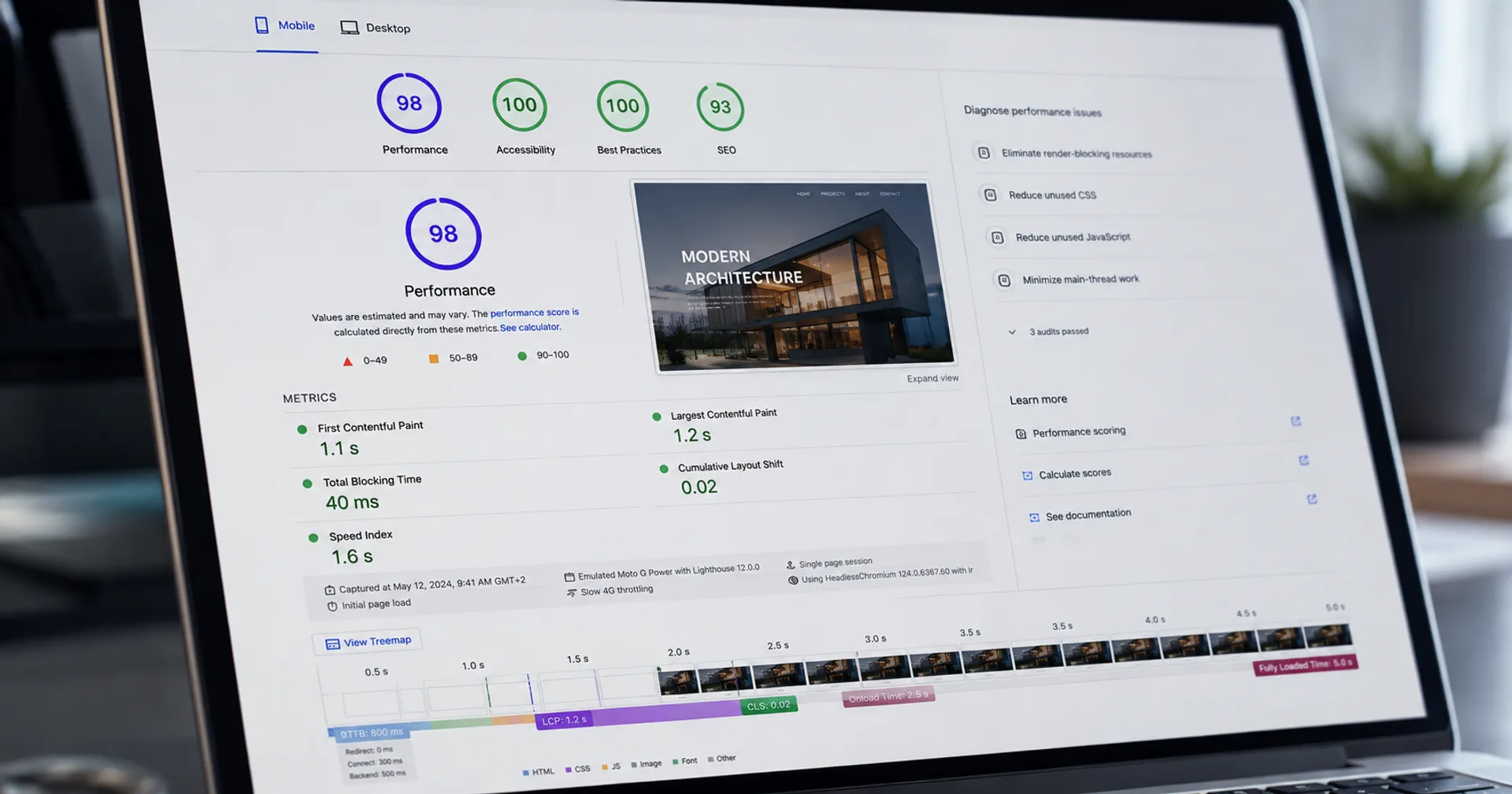
Service sites lose leads when the hero stalls, the form janks on tap, or layout shifts push the CTA. Core Web Vitals turn that friction into measurable LCP, INP and CLS targets your team can ship against.
The direct answer
For a typical service website, treat Core Web Vitals as a conversion gate: largest contentful paint under about 2.5s on mobile field data, interaction to next paint that feels instant on form taps, and almost no cumulative layout shift around hero, sticky bars and cookie banners. Lab scores in PageSpeed Insights help diagnose; Search Console and CrUX field data decide whether you are done.
Prioritise the homepage, your primary service page and the enquiry or free-audit landing page. Those URLs usually carry organic and paid traffic. Fixing a low-traffic blog post first does not move pipeline.
Vitals work belongs in SEO and performance and website development scope before you scale Google Ads spend on the same URLs.
Why Core Web Vitals matter for service businesses
Google uses Core Web Vitals as a ranking signal among many others. For service brands, the commercial impact is clearer than the ranking debate: slow LCP increases bounce on paid and organic landers, poor INP makes enquiry forms feel broken, and CLS causes mis-taps on phone CTAs.
Buyers comparing two agencies rarely articulate “your INP is bad.” They just leave. Measuring vitals gives you a shared language between marketing, design and engineering so performance is not a vague complaint.
If you sell locally in competitive markets such as Delhi NCR, mobile field data matters even more because map-pack and local search traffic is overwhelmingly mobile. Pair vitals work with local SEO for Delhi NCR service businesses when location pages are in play.
What each vital means on a service site
Do not chase a perfect lab score while field data for your money pages stays “Needs improvement.” Field data reflects real devices and networks your clients use.
Vital | What users feel | Common service-site cause | First fix |
|---|---|---|---|
LCP | Hero or headline takes forever | Huge hero image, late fonts, render-blocking JS | Compress hero, preload LCP image, cut blocking CSS/JS |
INP | Tap on CTA or form feels stuck | Heavy main-thread JS, tag manager bloat | Defer non-critical scripts; slim form libraries |
CLS | Page jumps while you try to click | Late banners, fonts, images without size | Reserve space; set dimensions/aspect-ratio |
Core Web Vitals checklist before you call it done
If paid traffic lands on a dedicated page, run the checklist on that URL separately. Campaign landers often accumulate tracking the marketing homepage does not have.
Pair vitals fixes with the conversion-ready landing page checklist when ads are live or imminent.
- Compress and size hero media; prefer modern formats; set width/height or aspect-ratio.
- Preload only the true LCP image and critical font subset; skip decorative preloads.
- Defer non-critical scripts; audit Google Tag Manager for duplicate or unused tags.
- Reserve space for announcement bars, cookie consent and sticky CTAs.
- Test enquiry forms on a mid-range Android phone on throttled 4G.
- Confirm field data in Search Console for the URL group that matters, not only a green lab report.
- Re-test after marketing adds a new pixel, chatbot or A/B tool.
Field data vs lab data
Lab tools simulate a controlled device. Field data aggregates real Chrome users. A site can look green in the lab and still fail CrUX because of third-party scripts, regional networks or heavy logged-in experiences you never tested.
Use lab tools to find the LCP element and long tasks. Use Search Console Core Web Vitals and CrUX to decide pass/fail for SEO-facing URL groups.
After a deploy, give field data time to refresh. Shipping a fix on Friday and judging CrUX on Monday is usually too early for low-traffic sites.
What to do next
Pull Search Console Core Web Vitals for your top landing pages. Rank fixes by traffic × severity, not by which page looks worst in a single lab run.
Request a free website audit if you want a structured review of speed, conversion paths and tracking on your live URL.
For ongoing care after launch, website maintenance and managed hosting keep regressions from reappearing when marketing adds tags.
Continue reading
Recent articles

Build·12 September 2026·3 min
What website development actually costs in India
Realistic website development cost ranges in India for 2026 — brochure, WordPress, Next.js and service sites, plus what moves the price up or down.

Build·11 September 2026·4 min
What to look for in a website development company in Delhi NCR
A practical guide to choosing a website development company in Delhi NCR: scope, stack, portfolio, process and red flags before you sign.
Build·11 September 2026·9 min
Next.js, WordPress, Shopify, and WooCommerce: How to Choose the Right Platform for Your Next Build
Compare Next.js, WordPress, Shopify, and WooCommerce for rebuilds and new sites, with use cases, tradeoffs, SEO, performance, and support.
Need a Core Web Vitals pass on your service site?
Share your URL. We will flag LCP, INP and CLS risks on the pages that actually get traffic.